

Hey there,
Welcome to this week’s issue of THE AI PARTNER. If you’re running a one‑person or very small business, this edition is all about turning AI from “something you try once” into a simple system that quietly handles your busywork while you focus on clients, products, and strategy. Inside, you’ll find one practical workflow idea, a tool spotlight on Zapier, an infographic on social media marketing trends for small business owners, five fresh reads from around the web, and a detailed prompt you can plug into your favorite AI assistant today.
Featured Tip
Stop dabbling, start building one AI workflow
A recent operator playbook for solopreneurs emphasizes that most people are still “chatting” with AI instead of wiring it into their real workflows, and that’s why it doesn’t feel like a true sidekick yet. The guide breaks every effective AI system into three layers—trigger, processing, and action—so you don’t get lost in prompts: a trigger like a new email or form submission, AI processing that summarizes, classifies, or drafts, and a concrete action like creating a CRM entry, a draft reply, or a task in your project tool.
For example, one recommended workflow is inbox triage: new emails trigger Claude to classify priority, extract action items and deadlines, and draft replies in your voice, with Zapier, Make or n8n routing those outputs into Gmail, Notion, or Slack—saving 30–45 minutes a day and turning “checking email” into a quick review step instead of a draining chore.
Tool Spotlight
Tool of the Week: Zapier for solo businesses

ZAPIER
Think of Zapier as a tireless assistant that connects the tools you already use—Stripe, Calendly, Gmail, Notion, your CRM—so information doesn’t get stuck in separate islands. In 2026, Zapier has layered AI on top of its thousands of integrations: Copilot lets you describe automations in plain language and auto‑builds multi‑step Zaps, while AI steps can summarize messages, score leads, or generate draft content inside your workflows.
For a coach or consultant, that might look like: when a new lead completes a Typeform, Zapier creates a CRM record, sends a warm welcome email, drops their details into a “Discovery Call Prep” doc, and posts a Slack notification—so every prospect feels seen instantly, without you living in your inbox.
Infographic of the week
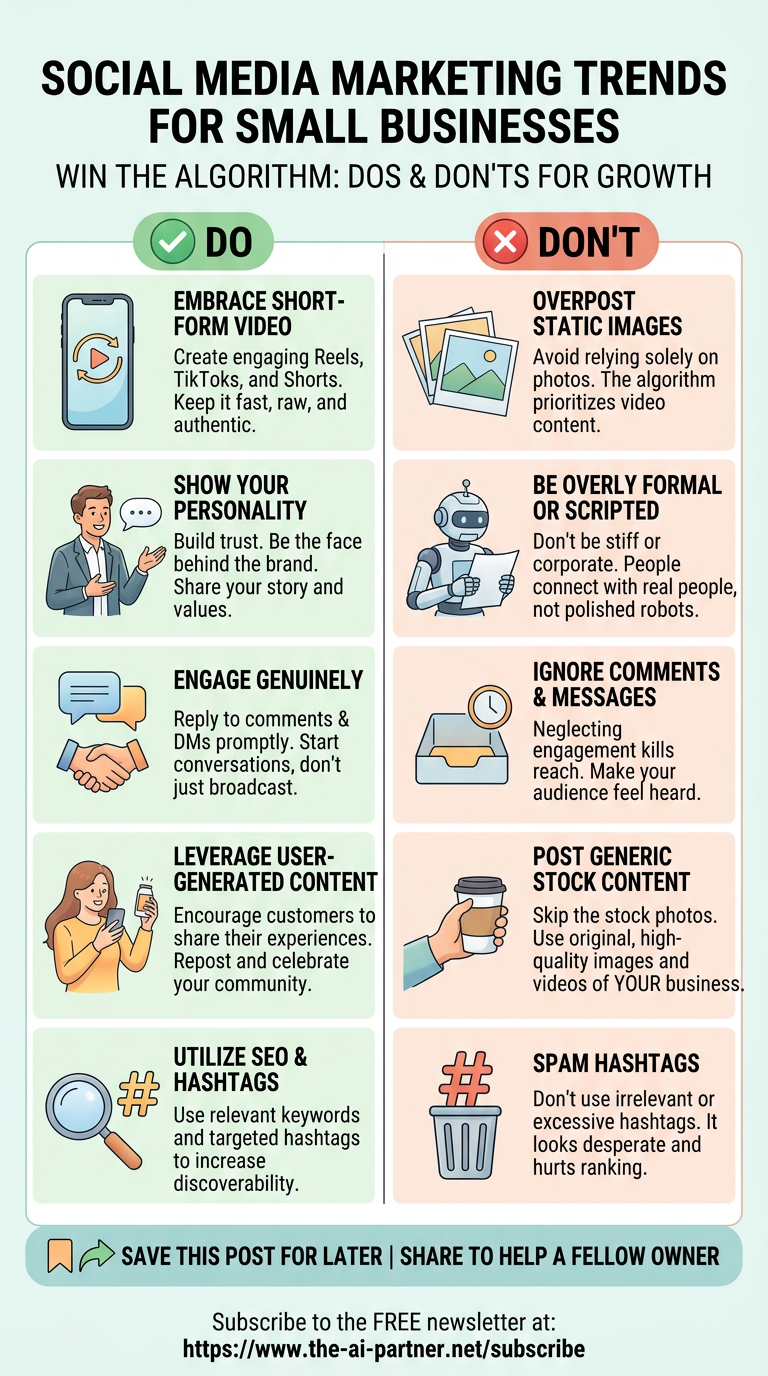
The focus area of this week’s infographic is “social media marketing trends for small businesses”. It shows a clear picture of what to do and what to avoid while using social networks. This infographic is generic and not specially for use of AI. Certainly, several tasks can be achieved by smart use of AI tools. Fortunately, we have a very wide choice of specific AI tools available now. I have covered a few of them in my previous issues and many more are coming in the future issues so keep an eye on the tools being covered here.
AI Vocabulary Corner

Coding Agents
Term: Coding Agents
Meaning: Coding agents are AI systems that don’t just generate snippets of code on demand. They take on whole coding tasks end‑to‑end—planning changes, editing files, running tests, debugging failures, and iterating until the software behaves as expected. In 2026, this moves beyond “ChatGPT wrote a function” to agents that can maintain a small app or website behind the scenes, making them a practical part of modern development workflows rather than a novelty.
Example: Imagine you run a small course business with a custom landing page and checkout flow, but you don’t have a developer on retainer. A coding agent could watch for errors in your payment logs, update a configuration file when a gateway deprecates an API, run automated tests, and suggest (or apply) code fixes—alerting you only when human judgment is needed, so you spend more time teaching and less time wrestling with technical glitches.
Links Worth Reading
Here are a few recent reads worth exploring if you’re using AI as a partner to run a solo or small business:
5 Small Business AI Updates to Test or Audit: A quick checklist on reviewing your AI stack costs, training data, and calendar automation as AI tools mature.
AI in Small Business 2026: What’s Actually Working (Beyond the Hype): Evidence‑based look at which AI use cases are delivering real value for local businesses versus buzz.
Are You Ready for the AI‑Powered Solo Revolution: Explores how one‑person businesses are using AI to research markets, ship faster, and compete above their headcount.
What AI Actually Changed for SMBs by Mid‑2026: A thoughtful breakdown of how AI moved from “experiment” to daily workflow for small teams.
AI Trends | July 2026 (Startup Edition): Insightful trend scan on persistent agents, adaptive reasoning, and governance for lean startups and solo founders.
PROMPT OF THE WEEK
Design my first “real” AI workflow for a one‑person business
You can paste this into your favorite AI assistant (ChatGPT, Claude, Gemini, etc.) and customize the bracketed parts:
You are an AI workflow architect helping a solopreneur or small business owner turn AI into a quiet, reliable sidekick instead of a one‑off tool.
My business:
Type: [coach / consultant / freelancer / local service / micro‑SaaS / other]
Niche: [e.g., leadership coaching for tech founders]
Main offers: [list your top 1–3 services or products]
Current tools: [email provider], [calendar tool], [CRM or spreadsheet], [task manager], [any AI tools you use now]
Biggest time drains: [e.g., email replies, lead follow‑up, content creation, meeting prep, invoicing]
Weekly time available to set this up: [e.g., 2 hours]
Tasks for you:
Ask up to 7 targeted questions to understand my workflow, tools, and bottlenecks.
Propose one high‑impact AI workflow I can build first (using tools like Zapier, Make, or n8n if relevant) that:
follows a clear trigger → processing → action pattern,
saves at least [X] hours per week, and
keeps a human‑review step for anything client‑facing.
Describe the workflow as a simple checklist I can implement without coding, including:
which apps to connect,
what data flows where,
example AI prompts for summarizing, classifying, or drafting.
Suggest 1–2 ways to expand this workflow later (e.g., add lead scoring, content repurposing, or meeting prep) once the basics are stable.
Keep your language concrete and tailored to a one‑person business with limited budget and time—avoid vague “strategy” talk and focus on steps I can take in the next 7 days.
Start by asking your clarifying questions, then wait for my answers before you design the workflow.
Closing note:
Thanks for spending a few minutes with this week’s issue of THE AI PARTNER. If you’d like help tailoring these ideas, tools, or the prompt to your specific business—whether you’re coaching clients, running a small agency, freelancing, or building a tiny product—just complete the survey below and tell me what you do, what you sell, and where AI feels confusing or promising right now. Your questions and stories are what shape future issues, so feel free to share what you’re experimenting with or where you feel stuck.
Warmly,
Alexandre G
Helping solopreneurs use AI better than before