

Hey there,
Welcome back to THE AI PARTNER, your weekly dose of practical, no‑fluff AI ideas for solopreneurs, small business owners, freelancers, coaches, and consultants.
This issue shows you how to make AI work quietly in the background to bring you more clients, smoother content, and more focused days. The tool spotlight of this week is on Descript, an AI video editing tool. Know the term AI safety, take away a ready to plug prompt and an infographic on the 70/30 AI task allocation rule. Happy reading.
Featured Tip
Let AI be your “customer concierge”
More and more buyers now ask AI tools like ChatGPT or Gemini to “find me the best [coach/designer/accountant/hotel] near me,” before they ever land on your website. That means AI often becomes the first “digital concierge” introducing your business to potential clients.
Recent case studies of small and medium businesses show three simple ways to adapt. First, treat AI‑generated inquiries differently: one manufacturer now screens leads that arrive via AI tools and only invests engineering time when the AI request matches their ideal customer profile. Second, a boutique hotel regularly checks how AI tools describe its rooms, location, and vibe, then updates its public content (website copy, Google Business Profile, reviews) so those descriptions stay accurate and compelling. Third, a B2B software company replaced occasional customer surveys with continuous monitoring of AI-generated market summaries and feedback, so they can react faster when positioning or offers fall out of date.
As a solopreneur, you can borrow the same playbook: once a month, ask AI to “describe my business and recommend me to a client like X,” then fix any gaps your new concierge is getting wrong.
Tool Spotlight
Tool of the Week: Descript - powerful AI video editing tool

DESCRIPT
Descript is an all‑in‑one audio and video editor that lets you edit media like a text document, which is perfect if you’re repurposing webinars, coaching calls, or client interviews into content. You can record, transcribe, and then cut or rearrange your video simply by editing the words in the transcript.
For solopreneurs, this means you can quickly remove filler words, add captions, clean up sound, and clip short extracts for LinkedIn, Instagram Reels, or TikTok—all inside one tool. Descript’s screen recording and multi‑track editing also make it easy to produce simple tutorials or sales explainers without a heavy video workflow. If you already do client calls on Zoom or Google Meet, try importing one session into Descript and turning it into three assets in under an hour: a social clip, a mini‑podcast episode, and a short lesson for your next course module.
Infographic of the week
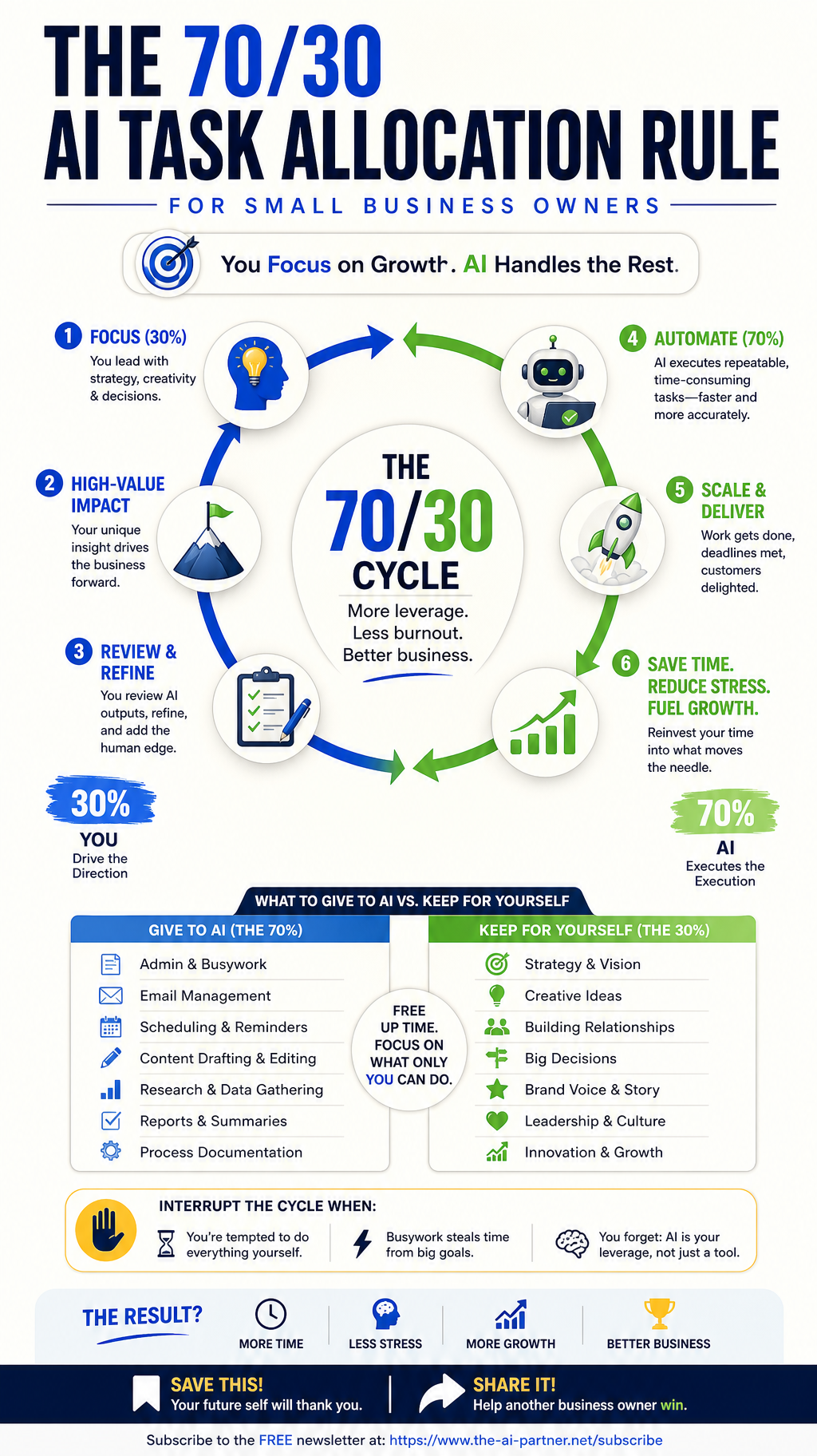
70/30 AI TASK ALLOCATION RULE
In several of my previous issues I have regularly written about delegating all the repeat works to AI. In this issue I had decided to put it up as an infographic. You may print it to be put somewhere you can always see it or just store it on your computer but at an easy look up place. Take a look at it every time you are tempted to do everything by yourself. See what part of your work can be handled by AI so that you keep focus on things only you can do.
AI Vocabulary Corner

AI safety
Term: AI safety
Meaning: AI safety is the field of practices and policies that keep AI systems from causing harm—whether that’s sharing sensitive data, producing biased or misleading outputs, or automating decisions without human oversight. For business owners, it’s about using AI in ways that protect your clients, your team, and your brand.
Example: A solo coach uses an AI assistant to summarize client session notes. To apply AI safety, they remove personally identifiable information, store notes in a secure workspace, set clear rules for what the AI may and may not do (for example, “no legal or medical advice”), and always review summaries before sharing them with clients. This keeps the productivity boost while reducing privacy, compliance, and reputation risks.
Links Worth Reading
Here are a few recent reads from around the web worth taking a look at to get a quick insight on what is happening around in the AI space.
How Small Businesses Can Put AI To Work Right Now – Small businesses don’t need large budgets, dedicated technology teams or complex infrastructure to find practical uses for artificial intelligence.
Meta's new Mac app helps influencers and small biz harness AI – Meta recently said it's debuting a new Mac app to help influencers and small businesses use AI to improve the way they promote products and run their businesses.
AI & IT News for Small Businesses — July 2026 Roundup – Curated top 10 news stories with “why it matters” notes for smaller firms.
AI Optimism Meets Entrepreneurial Reality – A deep dive into how entrepreneurs are actually using AI and why it’s becoming a “great equalizer” for small business.
AI Is Changing How Customers Choose Your Business – How AI tools now shape buyer choices and what small businesses can do to stay visible and relevant.
PROMPT OF THE WEEK
Audit how AI introduces your business and fix the gaps
You can paste this into your favorite AI assistant and customize the parts in brackets:
You are an AI marketing advisor for a [describe your business: e.g., “solo LinkedIn consultant serving B2B founders in Europe”].
Step 1 – Customer profile
Ask me 6–8 focused questions to understand my ideal client: their industry, size, budget, main pain points, and the outcomes they care about most.
Step 2 – Current visibility
Based on my answers and what you can see from my public presence (website, LinkedIn, Google profile—summarize what you find), write a short paragraph that describes how you think AI tools like ChatGPT or Gemini would currently introduce my business to a potential client.
Step 3 – Gap analysis
List the top 5 mismatches between (a) how AI would introduce me now and (b) how I actually want to be positioned (offer, niche, authority, style, proof). For each mismatch, suggest one concrete fix: a copy change, a review to collect, a page to add, or a content idea.
Step 4 – Action plan
Turn this into a simple 7‑day plan I can follow in under 45 minutes per day, with specific tasks for each day (e.g., “Day 1: update website hero text to reflect X,” “Day 3: write and post 1 LinkedIn case study about Y”).
Whenever you need more detail about my business to be precise, ask me a clarifying question instead of guessing.
Closing note:
Thanks for reading this week’s issue of THE AI PARTNER. If you’d like me to go deeper on any of these topics—or if you have a question about applying AI in your own solo business—just hit the survey button below and tell me a bit about your niche and current challenges. Your ideas and questions are what shape future issues.
Warmly,
Alexandre G
Helping solopreneurs use AI better than before