

Hey there,
Welcome to this week’s issue of THE AI PARTNER — your friendly check‑in on using AI to work smarter as a solopreneur, freelancer, coach, consultant, or small business owner. Inside this edition you’ll find a practical workflow inspired by real solo founders, a spotlight on MindStudio AI, a useful infographic, a clear vocab term decoded, fresh links on the latest AI‑for‑small‑business trends, and a detailed prompt you can plug straight into your favorite AI assistant.
Featured Tip
Turn your “brain dump” into better client work
One of the fastest ways to make AI genuinely useful in a solo business is to use it as a thinking partner between your raw notes and your polished deliverables. Instead of staring at a blank page, capture what’s already in your head — ideas from client calls, scattered bullet points, voice notes, or rough drafts — and let AI turn that into a structured brief first.
Recent interviews with solopreneurs show this simple pattern working across coaching, marketing, and content businesses: they record voice notes during the day, feed them into tools like ChatGPT or Notion AI, then get back a clear outline, task list, or draft that they can refine with their own judgment. The win isn’t just time saved; it is mental energy redirected from formatting and rewriting into higher‑level decisions, strategy, and client relationships. This week, try one experiment: after your next client call, brain‑dump everything into an AI assistant, ask it to create a structured summary and action plan, then edit that output into your final document — you’ll likely ship faster and feel less drained.
Tool Spotlight
Tool of the Week: MindStudio AI for “mini‑apps” in your solo business

MINDSTUDIO AI
MindStudio AI is a no‑code platform that lets you build small, custom AI tools — things like lead‑qualification bots, client‑intake assistants, or internal dashboards — without writing a line of code. You design flows visually: connect an LLM to your data (documents, Airtable, Notion, Google Sheets), define the steps in the workflow, and then publish the result as a simple web app or embedded widget your business can actually use.
For solopreneurs and small service businesses, this means you can turn repetitive processes into “quiet AI systems” instead of juggling them in your head or spreadsheets — for example, a coaching intake agent that asks new clients the right questions and summarizes their answers, or a mini‑research assistant trained on your niche content. There’s a free tier for testing and affordable paid plans once you’re ready to run multiple apps, which makes it realistic even if you’re just starting to formalize your workflows.
Infographic of the week
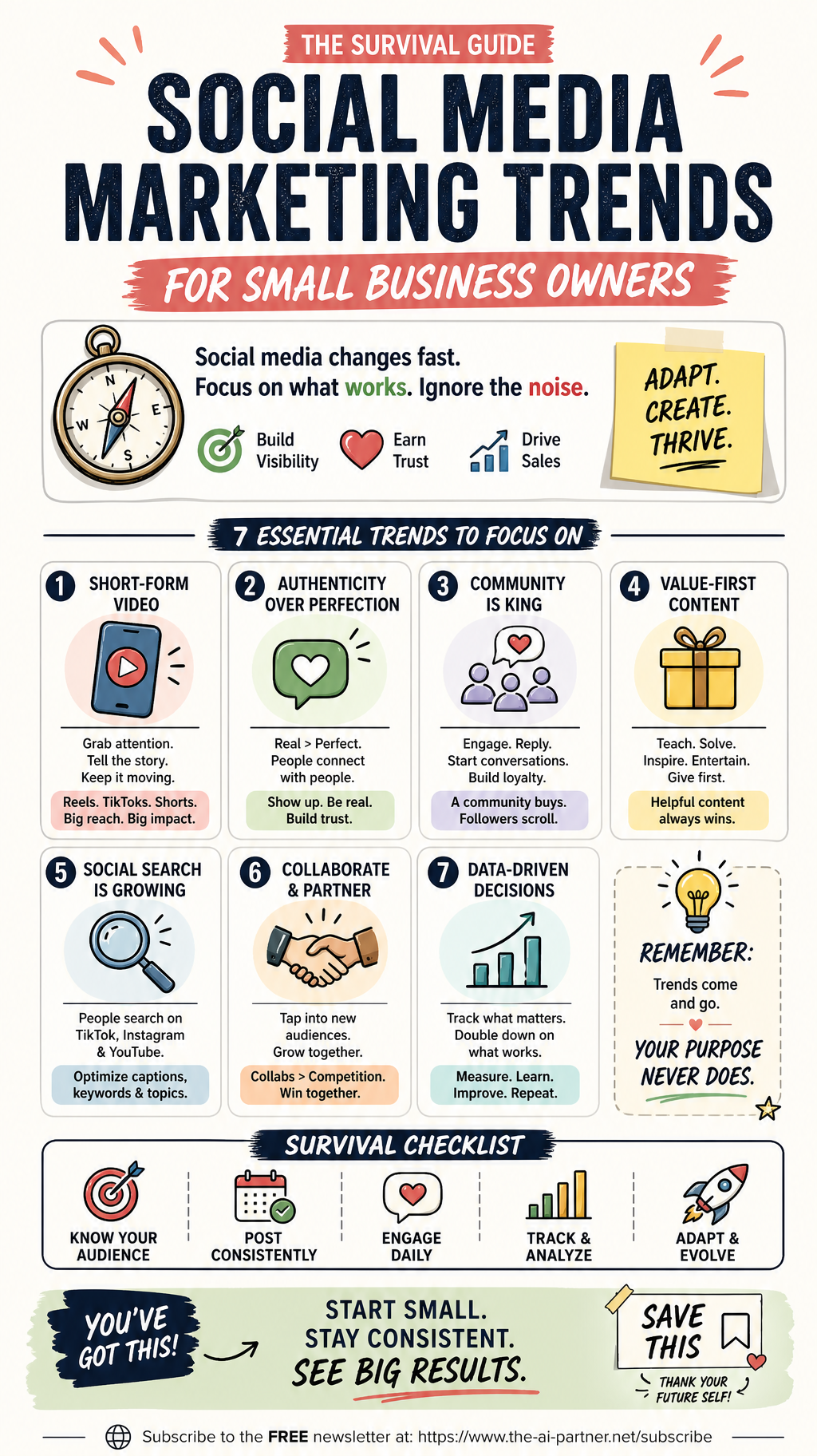
Social Media Marketing Trends Survival Guide
In modern day marketing almost all businesses, small or big use social media for marketing their services or products. The biggest challenge is to keep up with the ever-changing social media marketing trends. It becomes even more difficult for small business owners due to multiple reasons like lack of time, resources, skills etc. That is why for this issue I decided to add a simple and straight to the point infographic called the survival guide to social media marketing trends for small business owners. I sincerely hope that you will find this useful. Save it for future use and share it with your collaborators.
AI Vocabulary Corner

Tokens
Term: Tokens
Meaning: Tokens are the small pieces of text (like parts of words, full words, or punctuation) that AI models use to read, understand, and generate language. When you send a prompt, the model breaks it into tokens, processes those mathematically, and then replies by predicting and emitting one token at a time. Tokens also determine how much the AI can “remember” at once (its context window) and how much an interaction costs to run.
Example: Imagine you paste a 1,000‑word client brief into your AI assistant and ask for a summary; that’s roughly 1,300–1,400 tokens of input, and the summary might add another few hundred tokens of output. If your model’s context window is 8,000 tokens, that whole conversation (your long brief plus a few follow‑up questions) fits comfortably, but if you go far beyond that, older details may fall out of memory and you’ll need to restate key information.
Links Worth Reading
Some useful recent links from around the web worth reading helpful to run a solo or small business:
How small businesses are using AI to protect jobs, not just cut them – Article on small firms using AI to support staff and stay competitive, rather than replace people.
Why millions of small businesses are finally turning to AI, and where they're starting – Data‑rich overview of AI adoption in US small businesses, including burnout and workflow bottlenecks.
July 2026 AI Industry Update – small business surveys and adoption trends – Round‑up covering fresh survey on how many small businesses now use AI, plus what they say they still need help with.
Solo founders explain how AI changed their day-to-day work – Case study–style piece on three solopreneurs using AI to draft documents faster, format content, and reduce decision fatigue.
SMB AI performance divide – who’s pulling ahead and why – Video summary (with linked sources) on why AI‑deploying small businesses are outpacing those stuck in “testing mode.”
PROMPT OF THE WEEK
Design a “quiet AI teammate” for one workflow
You can paste this prompt directly into your favorite AI assistant (ChatGPT, Claude, Gemini, etc.) and fill in the brackets with your details:
Act as a practical AI workflow designer for a one‑person or very small business.
Your job is to help me turn one messy, manual process into a simple “quiet AI system” that runs with minimal supervision.
My business context:
Business type: [describe what you do]
Niche / audience: [who you serve]
Main offer: [product/service you sell]
Biggest bottleneck right now: [e.g., client onboarding, proposal writing, follow‑up, content, admin]
Tools I already use: [email platform, calendar, CRM, notes app, etc.]
Comfort level with tech: [low / medium / high]
What I want from you:
Ask up to 5 clarifying questions about my bottleneck and tools before you propose anything.
Design one end‑to‑end workflow that uses AI to remove as much busywork as possible while keeping my communication personal and human.
Describe the workflow in plain language (no jargon), including:
Where AI fits in
Which tools or integrations you recommend
What I still need to do manually as the business owner
Give me a step‑by‑step setup checklist I can follow in under 90 minutes, broken into very small actions.
Suggest one “starter version” I can launch this week, and one “advanced version” I can grow into later.
Finish with 3 ideas for how I can measure whether this AI workflow is actually helping (e.g., time saved, more leads, fewer dropped tasks).
Keep your tone friendly and encouraging, and assume I’m smart but busy — I don’t want a complex system, I want something realistic that fits a solo business.
Closing note:
Thanks for spending a few minutes with this week’s issue of THE AI PARTNER. I hope there’s at least one idea, tool, or prompt here that you can put to work in your business over the next few days. If you have a question, a topic you’d like me to dig into, or a specific workflow you’re trying to “AI‑ify,” just complete the survey below and tell me a bit about your business and where you’re stuck — your questions and ideas directly shape future issues.
Warmly,
Alexandre G
Helping solopreneurs use AI better than before